Friday, June 28, 2013

Cloud to Cloud Lightning

©JP Parmley

5DMIII, 24-70mm 2.8L, 20 sec, f/11, ISO 4000
Last night we had a small thunder cell move through that was producing a little bit of cloud to cloud lightning. We have not had any "Big" bolts lately like we have shown in previous posts.  Using the techniques from earlier posts did not produce any images due to the lack of light from the larger bolts.

So what can you do? Increase the shutter, open the aperture, or increase the ISO.  Well, since I was already at 20 and 30 seconds exposures and experimenting with increased apertures blew the clouds out, I decided to leverage the higher ISO capabilities of the 5DMIII.

These shots were take at 20 and 30 seconds at f/11 and ISO 2500 and 4000.  The ISO allowed the capture of the smaller lightning bursts inside the clouds and captured the stars as well.  I ran these through Lightroom 4 for noise reduction and cropping since the lightning was so small and far away.


5DMIII, 24-70mm 2.8L, 30 sec, f/11, ISO 2500

5DMIII, 24-70mm 2.8L, 30 sec, f/11, ISO 2500
Enjoy,

JP


Tuesday, June 11, 2013

Lightroom Vintage Effects

©JP Parmley

In just about all cases photographers are using software tools to enhance digital images.  While these tools never replace proper technique, you can achieve some stunning results with the tools available to you.


The above picture that was taken with a Canon 5D Mark III, 24-70mm 2.8L, with an off camera flash to the left.  The picture was taken at ISO 125, 1/200th, f/7.1.  I used the following steps to create the vintage picture.

1) Imported into Lightroom 4
2) Applied a saved preset
3) Made some minor adjustments to the exposure
4) Ran picture through Portrait Professional for minor touch-ups
5) Used Photoshop for minor Dodge and Burn on the dress

The key to getting this look is the preset in Lightroom.  After playing around with other pictures, I saved the settings as a preset.  I describe how to save presets in the April 4, 2013 post if you need step by step directions.

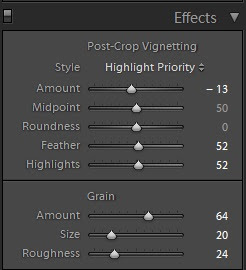
Here are the settings to this preset.


These settings should get you real close to moving the original picture to the final version.  Depending on the light source, you will have to play with the white balance to get the look you are going for.


There are lots of free presets that you can also download.  Simple searches should provide you with a wide variety of presets that you can use, edit and make your own.


Enjoy.

JP


Sunday, April 21, 2013

Golden Sun

©JP Parmley
There is nothing like that first few minutes of light from a sunrise and the last few minutes from a sunset to just make everything fall into place.  Shooting at Cox Arboretum in Miamisburg, OH this evening provided one of those opportunities.  As I type this, I have the 19x13 image coming off the Canon 9500 Mark II printer so it can be mounted in the office in the morning.


Canon 5D Mark III, 70-200mm L IS, 1/200th, f/4.5, ISO 200


Here are the elements that bring this shot together.  

1) Timing!!!!!  With about 10 minutes of light left in the day, we are seeing that "Golden Hour" color just shine through the shot.

2) The arrangement of the shot has the sun at about 10 o'clock  and low in the sky. Shooting at this angle gave the large sun flare spots just to the left of the subject.  I was shooting with a 70-200mm L IS on a 5D Mark III body to also give the shot some compression.

3) I added a fill flash just slightly off camera left

3) I added some vignetting in Lightroom 4 to help bring the focus to the center

4) The color of the dress and flowers matched

5) Finally, remember the rule of thirds!


The whole series of pictures came out amazing.

Enjoy!

JP


Saturday, April 13, 2013

Canon Lens or Coffee Mug?

©JP Parmley
Here is something only the hardcore photography fan will want......that is why I got one.  I don't normally endorse online stores but this one was too good to pass up.

It took about 3 weeks to receive it, but I think it was worth the $12.


http://nomorerack.com/daily_deals/view/310709-slr_camera_lens_stainless_steel_travel_coffee_mug_with_leak_proof_lid

Enjoy
JP

Thursday, April 4, 2013

Editing Overcast / Cloudy Pictures in Lightroom 4

©JP Parmley

Here is a quick way to convert photos taken on cold, overcast days to something a bit warmer.  This particular photo was taken in between the wedding and the reception at a local park.  It was about 35 degrees and complete overcast.  Because of the cold temperature, we were trying get a few quick pictures. 

For this example I used Lightroom 4, my primary workflow tool for color, exposure, and noise editing.  I have created a preset that I apply to pictures taken in this type of situation.  I can then fine tune them to meet the specific pictures needs.

The preset has the following settings:

Contrast +33
Highlights -88
Shadows +45
Whites -34
Blacks +34
Clarity +7
Vibrance +7
Saturation +8


 To create the preset in Lightroom, set the sliders where you want them, then click the "+" icon above the preset pane.  Give it whatever name you want, then it will be available for you to apply on future pictures. I have also added a little vignette after the fact as well.

In a perfect world, I would have adjusted the white balance to a set of portable strobes and reflectors, but the wind was blowing making the wind chill probably in the low teens. With us just getting a few pics, we opted to edit the look after the fact and save the bride from freezing in her strapless dress.

After
Before


Enjoy

JP


Saturday, March 30, 2013

Turning an Overcast Sky Blue

©JP Parmley

I recently had someone ask me how to turn an overcast sky blue.  If you have trees that you can see through and they are high above the horizon, this can be very tricky.  But if they are low, like the example below, there are several methods you can use to get the affect, but one simple way for even novice Photoshop users is to add a blue gradient fade.

First, use any selection tool to select just the sky.  Don't worry about being perfect around the horizon because the blue will be fading to transparent at that point.   Once you have the selection, choose the gradient tool and put it in a color to transparent and linear mode  (see red arrows). Then select a light blue for your top color.

Then use the gradient tool drawing from the top of the picture to about 3/4 way down the selected sky.  If you do not like the result, try drawing longer or shorter lines.  Just be aware that this tool is additive.  If you do not like the first result, undo it.  If you keep using the tool on top of an existing blue gradient fade, it keeps adding to the blue.

Try playing with different shades of blue and opacity. 

Enjoy.
  
Original Picture with Overcast Sky


Use the this mode for the gradient tool


Blue sky added.

Sunday, March 10, 2013

Canon 5D Mark III - High ISO

©JP Parmley

Ever tried getting that picture of something in motion in low light, without a flash?  When I upgraded the 5D Mark IIs to Mark IIIs, I did so specifically for the higher ISO range and the 61 point focus system.  The picture below may not look like a stellar professional picture, but once you realize the situation, you will find how amazing it is that this picture is even visible.

Before I give you all the details or you cheat and look to the end, decide what you think the settings were for this picture.  I will tell you that the subject is moving at about 15 mph and the aperture was 2.8.  As you can see this is an indoor, poorly lit race track.


I suspect that you may be thinking that it was taken at about 1/30-1/60th, f/2.8, ISO around 1600-3200.  This setting range would be consistent with many photos of this type of shot.  However, take a closer look at the hair and the wheels.  You can see that the motion has been stopped......you can even see the valve stem of the rear wheel.  So now we know the shutter was much faster than 1/60th, otherwise it would be blurred from the motion.

In fact, I intentionally pushed the limits of this picture by setting the shutter to 1/500th and put the ISO on an Auto setting. This would push the ISO to an extreme.  I could have shot this at about 1/200th and had almost the same result with a lower ISO and a much lower noise level.  But I wanted to show what pushing the Mark III would do.  The 1/500th shutter pushed the ISO to 12,800!  

Now, I would normally slow the shutter down a little to bring the ISO down, but for demonstration purposes, I wanted to see the performance.  If you would have wanted an ISO in the 1600-3200 range, you would have had to have a much slower shutter and would have had extreme motion blur.  The bottom line is that you could not have gotten this fast shutter shot with out the high ISO performance.

So here is one crude example of the high ISO performance of the 5D Mark III. Try taking a picture at ISO 12,800 on a Mark II or 7D and see what happens. Wedding season is just around the corner, in fact it starts next week in Cincinnati for us. This camera is a game changer as most reviews have said.  I am very much looking forward to the new creative modes this opens up.

Enjoy.


Saturday, March 9, 2013

Canon EF 24-70mm f/2.8L II USM review

©JP Parmley


Dpreview.com has completed their review of the the Canon EF 24-70mm f/2.8L II lens.  They describe it as

.."a near-flawless lens with optics that come very close to matching a set of top-quality primes. With fast, accurate auto focus and weather-sealed construction, it's difficult to find any really serious faults at all."

Check out the full review: Canon EF 24-70mm f/2.8L II Review

Thursday, March 7, 2013

Smoke on the Water

©JP Parmley

Smoke on the Water

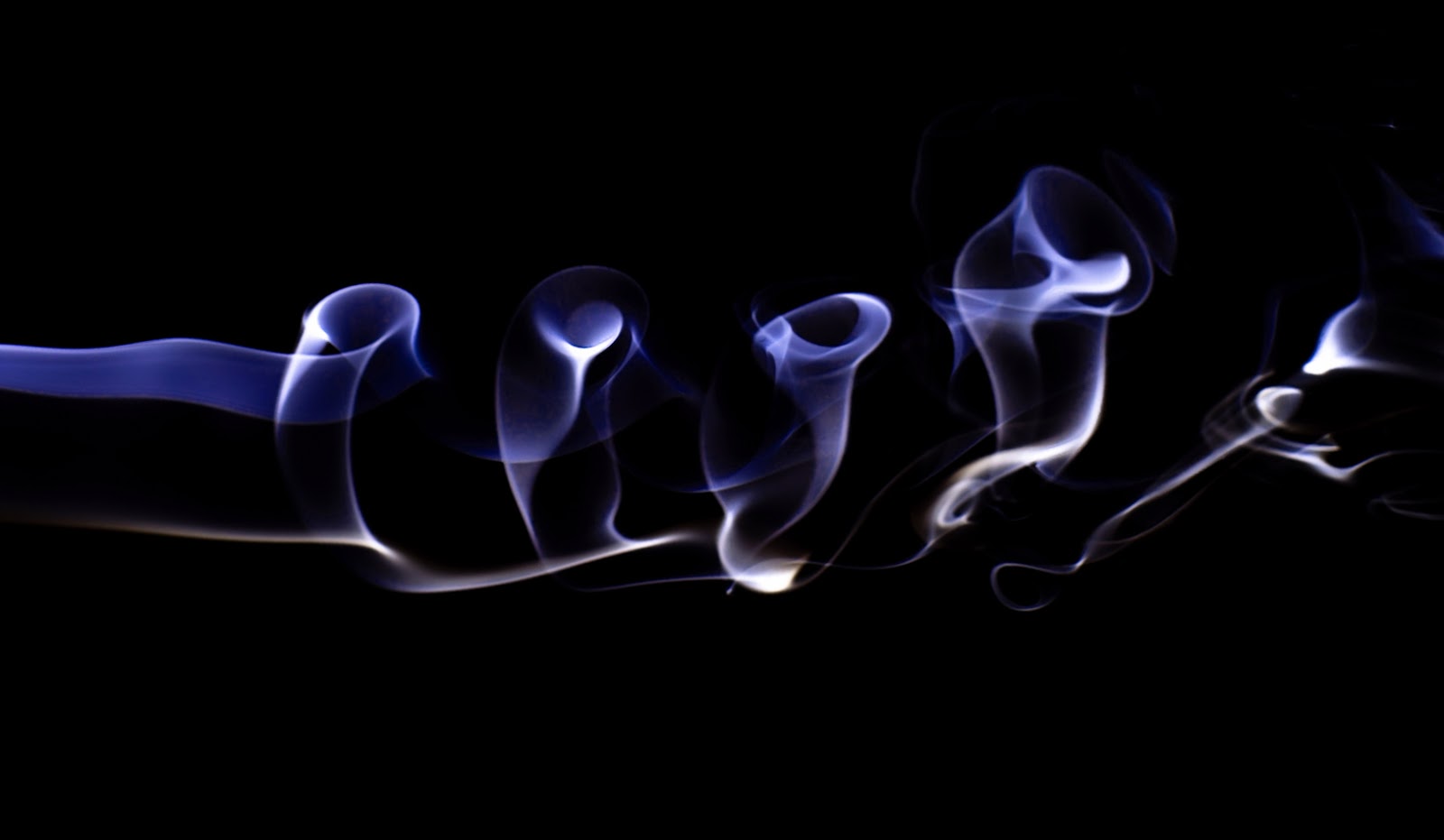
Here is a quick edit to one of the smoke pictures taken last year.  I was looking to add a little more color and a shadow.  But after I was done experimenting in Photoshop Elements, I ended up with something a little more dramatic.

I started off in Photoshop with the original picture.  After I rotated it, I made independent selections and feathered them about 40 pixels before I added the hue and saturation adjustments.  Once I had the colors where I wanted them, I then applied a flood filter from Flaming Pear.  You can a get this filter here.  http://www.flamingpear.com/flood.html

Original Picture

Adjusted Hue and Saturation

Flaming Pear Flood Filter

The adjustments I made are shown in the picture to get the effect I landed on.  After the water effect was added, I imported the final picture into Lightroom and began some light sharpening and color saturation local adjustments.  It took about 10 minutes to finalize the edits.

I'm still waiting for the weather to break.  We have lots of engagement and wedding shoots to complete going into spring!

Enjoy!

Saturday, February 23, 2013

Canon 7D Mark II?


©JP Parmley
Take a look at a recent article at canonrumors.com.  What will the next generation 7D look like? They speculate the following:


Specifications
  • 24.1mp APS-C Sensor
  • Dual DIGIC V
  • 10fps
  • Dual Memory Card Slots (Unknown configuration)
  • 61 AF Points (I wonder if we’ll get red focus points in AIS?)
  • 3.2″ LCD
  • Build quality like 5D3
  • GPS & Wifi
  • $2199 ($500 more than the 7D at launch, I’d like to see such a camera come in under $2000)
  • ISO Performance to get close to the 5D3
  • “Lots of video features”

http://www.canonrumors.com/2013/02/canon-eos-7d-mark-ii-spec-list-cr2/

Sunday, December 30, 2012

Canon 5D Mark III


©JP Parmley
Well after much debate, I have upgraded my 5D Mark II to the Mark III.  I was looking to improve the low light shooting scenarios with the higher ISO capabilities.  The fact that a whole host of other updates such as the focusing system, dual memory cards, faster processor, and integrated HDR was just icing on the cake.

With only about 200 images taken so far, it is clear that this camera opens up a whole new world of opportunities that others have no chance of obtaining.  I am not going to write up a review of the Mark III as there are hundreds of them out there.  But I will say this, my initial impression is very high.  Pics taken at 10,000 and 12,800 ISO are great....try that on a Mark II and they are not so usable. 

Needles to say, the creative ideas are flowing on how to leverage this new expanded ISO range.  I am looking forward to seeing what comes from it.   Have any ideas?.....shoot me over a message.  Stay tuned for some sample images.......

JP

Saturday, December 8, 2012

My First Smoke Pics


©JP Parmley
They say that once you start smoking, it can become habit forming.  Today I set up my first smoke picture experiment and I am starting to believe I'm hooked.  No two pictures will ever be the same and the imagination can run wild interpreting the smoke formations, much like one does with clouds. 

The set up for these pictures is very straight forward and easy to set up.  With a black background I have a strobe camera left.  With a 50mm prime lens mounted on a Canon 5D MII, I configured the shots at f7.1-16 and 160th, ISO 50.  I cranked up the flash to compensate for the small aperture and low ISO.  I spent $4 dollars on a hand full of incense sticks and off I went.

After converting the raw images to JPG, I imported them into Photoshop where a quick adjustment of the hue and saturation provided the color.  I am looking forward to shooting these again with my 24-70 2.8L macro lens as well.


Saturday, November 10, 2012

Sun Sets with Point and Shoot Camera

©JP Parmley
Two weeks ago, my wife and I had the opportunity to take an western Caribbean cruise.  The minute we decided to go, nearly 9 months prior, the dilemma started.  Do I take my favorite 5D MII and my work horse 24-70 2.8L?  If you have ever been on a cruise you know there is lots of three things: Sun, water, and sand (at the beaches), none of which is terribly great for camera equipment.

After much thought, I decided to leave the pro gear at home, find a decent point and shoot camera so I could enjoy the vacation and not worry about my gear every minute of the day.  I landed on the Canon S100.  I chose this model because of three factors; 1) It can shoot in a RAW format. 2) It has a 2.0 lens, and 3) It has a fully manual mode.

Now, the pictures I show below are in no way professional quality, but I was quite happy with some of the results with the little $360 point and shoot.  If you are looking to get a better sunset picture with your point and shoot, follow these guidelines.

Take a look at the first picture.  We have all seen someone's vacation picture that looks like this.  A typical result from an automatic or program mode that utilize an evaluative metering mode.  The pictures that follow leverage a fully manual mode, exposing with  spot metering on the sun and then adjusting the shutter to underexpose from 1/3 to 1 1/3 stops.  The color is brought out and gives the picture some contrast and dimension.  The only post processing that was performed was to run these through Lightroom 3.6 to reduce some of the noise that point and shoots typically have.


Program mode with evaluative metering.......Don't do this!

Manual Mode with spot metering

Manual Mode with spot metering


Manual Mode with spot metering

Manual Mode with spot metering

Manual Mode with spot metering


Besides insuring your exposure is correct, think about the rule of thirds.  To add some additional dimension, place the horizon on one of the two third's lines, depending on if you want to highlight the sky or the ground.
 
If you have any questions about how to get the best out of your point and shoots, let me know.

Enjoy,

JP


Thursday, October 11, 2012

Custom Bokeh

 ©JP Parmley


Here is a quick and simple method to creating custom bokeh effects using just construction paper, tape and a scissors.    Watch the video here.


Sunday, September 30, 2012

Processing HDR Images of Classic Cars


 ©JP Parmley

I wanted to share my techniques of processing the HDR images of the classic cars.  The video below will show three basic steps.

1) Lightroom
2) PhotoMatrix
3) Lightroom

The third step is where all the magic takes place and the final action I take is what gives the cars the high gloss look and feel. 

Watch the video here.


Thanks

JP